In today's digital environment, businesses depend on applications and online services that need to remain accessible, responsive, and reliable. Whether customers are visiting a website, employees are accessing business applications, or organizations are managing essential services, even a short interruption can affect productivity and customer satisfaction.
As businesses grow, their applications often need to support increasing numbers of users while maintaining consistent performance. Relying on a single server can create challenges, particularly when traffic increases or unexpected technical issues occur.
Microsoft Azure Load Balancer helps organizations address these challenges by distributing incoming traffic across multiple servers. Instead of relying on one server to handle every connection, it shares the workload between available resources, helping applications remain accessible and perform reliably.
In this article, we explore what Azure Load Balancer is, how it works, why it matters for businesses, and how it contributes to building a more reliable cloud infrastructure.
What Is Azure Load Balancer?
Azure Load Balancer is a cloud networking service provided by Microsoft Azure that helps distribute incoming network traffic across multiple servers.
To understand its purpose, imagine a busy customer service center. If every customer were directed to a single employee, waiting times would increase, and the entire operation could be disrupted if that employee became unavailable.
A load balancer works in a similar way. Instead of directing every connection to one server, it distributes connections among multiple servers that are available to handle them.
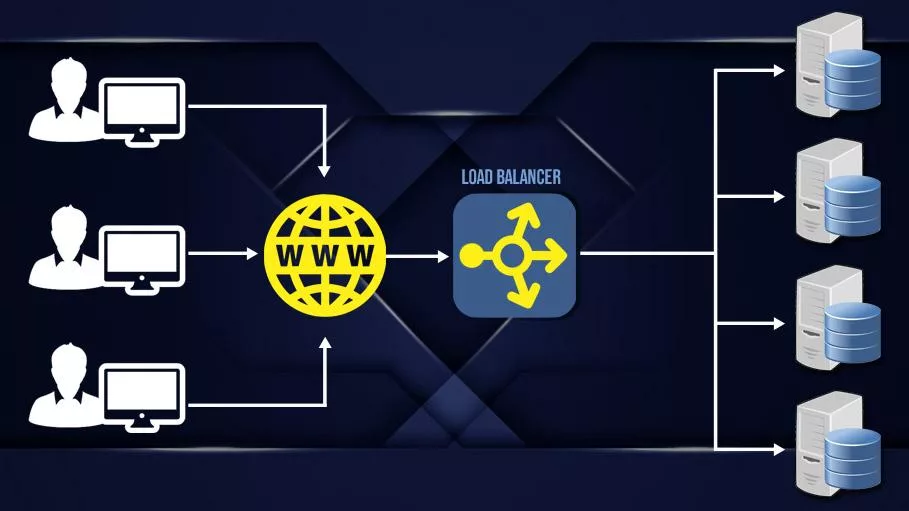
This approach helps prevent organizations from becoming dependent on a single server and supports a more resilient application environment.
Azure Load Balancer operates as part of Microsoft's cloud infrastructure, allowing organizations to manage how network traffic reaches their applications without having to build and maintain their own load-balancing hardware.
Why Is Load Balancing Important for Businesses?
As digital services become more important to everyday operations, maintaining application availability is no longer simply a technical consideration. It is a business priority.
Applications that experience frequent interruptions or slow response times can negatively affect customer confidence, employee efficiency, and overall business performance.
Azure Load Balancer provides several important advantages.
Improved Application Availability
When one server becomes unavailable, Azure Load Balancer can direct new connections toward other healthy servers. This helps reduce service interruptions and improves overall reliability.
More Efficient Traffic Distribution
By distributing connections across multiple servers, organizations can make better use of their available infrastructure and reduce excessive dependence on individual machines.
Greater Scalability
As demand increases, businesses can expand their application infrastructure by adding more servers. Azure Load Balancer helps incorporate those additional resources into the existing environment.
Better Business Continuity
By reducing reliance on a single server, load balancing supports more resilient infrastructure and helps organizations prepare for unexpected disruptions.
How Does Azure Load Balancer Work?
The concept behind Azure Load Balancer is straightforward.
When someone accesses an application, their connection first reaches the load balancer rather than being sent directly to a specific server.
The load balancer then directs that connection to one of the available servers responsible for running the application.
For example, consider an organization hosting a business application on two servers in Microsoft Azure.
Under normal conditions, both servers are available to serve users. Azure Load Balancer distributes incoming connections between them, allowing the organization to use the capacity of both servers.
If one server experiences a problem, the load balancer can recognize that it is no longer healthy and stop sending new connections to it. The other server can continue serving users, provided it has sufficient capacity.
This arrangement reduces the risk that an individual server failure will make the entire application unavailable.
However, load balancing does not automatically guarantee uninterrupted service. Existing connections to a failed server may be lost, and the application itself must also be designed to handle failures appropriately.
Understanding the Configuration Process
Configuring Azure Load Balancer involves connecting several important parts of an organization's cloud infrastructure.
Although the underlying technology is sophisticated, the overall process can be understood through a few straightforward stages.
1. Preparing the Application Infrastructure
The first stage is ensuring that the application is available on multiple servers within Microsoft Azure.
These servers work together to support the same application, providing additional capacity and reducing reliance on a single machine.
2. Establishing a Central Entry Point
The next stage is creating a shared point through which incoming connections reach the application.
This means users can access the service through a consistent address without needing to know which individual server is responding.
3. Connecting the Available Servers
Once the entry point is established, the servers responsible for handling the application are associated with the load balancer.
This allows incoming connections to be distributed across the available infrastructure.
4. Ensuring Servers Are Available
Azure Load Balancer regularly checks whether the connected servers can respond as expected.
If a server becomes unavailable, new connections can be directed toward the remaining healthy servers, helping maintain application accessibility.
5. Verifying Performance and Reliability
The final stage is confirming that users can access the application and that it continues operating when one of the servers becomes unavailable.
Regular monitoring helps organizations identify potential problems and maintain a reliable environment over time.
Supporting High Availability in Microsoft Azure
High availability refers to the ability of an application or service to remain accessible despite certain failures or infrastructure disruptions.
For many businesses, this is especially important when applications support essential operations, customer transactions, or internal communication.
Azure Load Balancer contributes to high availability by allowing multiple servers to support the same service.

Imagine an online booking platform that receives requests throughout the day. If the platform depends on only one server, a failure of that server could prevent customers from accessing the service.
With a properly designed load-balanced environment, multiple servers can handle incoming connections. If one becomes unavailable, the remaining healthy servers can continue supporting the application.
This approach is particularly valuable for organizations that cannot afford extended service interruptions.
Microsoft Azure also allows businesses to distribute infrastructure across separate physical locations within a region, known as Availability Zones. Combining this approach with load balancing can provide greater protection against localized infrastructure failures.
Maintaining Consistent Performance as Demand Grows
Business applications rarely experience exactly the same amount of traffic throughout the day.
An e-commerce platform may experience increased activity during promotional campaigns, while an internal business system may see its highest usage during working hours.
As the number of users increases, infrastructure must be able to support the additional demand.
Azure Load Balancer helps by allowing traffic to be distributed across multiple available servers instead of concentrating connections on a single resource.
For example, a growing organization might initially operate its application on two servers. As demand increases, it can expand its infrastructure with additional servers and include them in the load-balanced environment.
However, adding a load balancer does not automatically increase the processing power of existing servers. Organizations must ensure that sufficient server capacity is available to support their workloads.
This combination of flexible infrastructure and efficient traffic distribution helps organizations prepare for future growth without unnecessarily redesigning the way users access their applications.
Security and Reliability Considerations
While availability and performance are essential, security must remain a priority when designing cloud infrastructure.
Azure Load Balancer supports the delivery of application traffic, but it is not a complete security solution on its own.
Organizations should consider several important principles when building a reliable environment.
Protect access to applications. Only necessary network connections should be permitted, reducing exposure to unnecessary security risks.
Secure the underlying servers. Systems should receive regular updates, appropriate access restrictions, and continuous security monitoring.
Protect sensitive information. Applications handling confidential or personal data should use appropriate encryption and additional security controls.
Monitor application health. Identifying unusual behavior or service disruptions early helps organizations respond before issues become more serious.
Plan for unexpected failures. Reliable cloud infrastructure should account for potential disruptions affecting servers, networks, and supporting services.
By combining these principles with Azure Load Balancer, businesses can establish a stronger foundation for secure and dependable application delivery.
When Should Businesses Consider Azure Load Balancer?
Azure Load Balancer is particularly useful for organizations that operate applications requiring consistent accessibility and the ability to handle multiple simultaneous connections.
Typical scenarios include:
-
Business-critical applications: Systems that support essential operations and need to remain consistently accessible.
-
Customer-facing platforms: Online services that must reliably respond to users throughout the day.
-
Growing digital services: Applications experiencing increased demand that may require additional infrastructure capacity.
-
Internal enterprise systems: Applications used by employees across departments or office locations.
-
Cloud modernization projects: Organizations moving traditional applications into more scalable and resilient cloud environments.
The right approach depends on the type of application and its requirements. For example, websites requiring advanced application-level traffic management may benefit from other Azure services, such as Azure Application Gateway.
Selecting the appropriate solution is an important part of designing an effective cloud architecture.
Building a More Resilient Cloud Infrastructure
A reliable cloud environment requires more than powerful servers. It requires an infrastructure design that can adapt to changing demand and continue supporting applications when individual components experience problems.
Azure Load Balancer is one part of that approach.
By providing a consistent entry point, distributing incoming connections, and helping direct traffic away from unhealthy servers, it supports a more dependable application environment.
When combined with appropriate server capacity, monitoring, security, and availability planning, load balancing can contribute significantly to long-term operational stability.
For businesses investing in Microsoft Azure, understanding these capabilities is an important step toward creating cloud solutions that are prepared for both current needs and future growth.
Conclusion
As organizations become increasingly dependent on digital services, application availability and consistent performance are essential to business success.
Azure Load Balancer provides a practical way to distribute network traffic across multiple servers, reduce dependence on individual resources, and support more reliable application delivery.
Its value extends beyond traffic distribution. When incorporated into a well-designed cloud architecture, it helps businesses improve resilience, accommodate growth, and reduce the impact of unexpected infrastructure failures.
At Hopp Solutions, we believe that successful cloud infrastructure starts with thoughtful planning, reliable architecture, and solutions designed around real business requirements.
By making effective use of Microsoft Azure networking capabilities, organizations can build a stronger foundation for secure, scalable, and dependable digital operations.